
The Ins and Outs of Protecting Your Privacy on Facebook
 Lately it seems like everywhere you look, people are talking about Facebook privacy concerns. Some have even gone so far as to close their Facebook accounts. For an individual user, this is no big deal, but for a business to ignore Facebook over something that can easily and effectively be addressed, is unwise to say the least. Why? With over 600 million users (1/2 of whom log onto their Facebook accounts daily), you can be sure your customers – and your competitors – are using Facebook. So it just makes good business sense to capitalize on the power of this great marketing tool.
The good news about privacy on Facebook is that this platform gives you more options for deciding your level of privacy than just about any other site out there. The bad news might be that all those choices can be overwhelming. So, we’ve put together a primer on the two primary areas of Facebook privacy: Sharing and Connecting. You’ll see that protecting your privacy on Facebook really isn’t that complicated, and you can then have peace of mind and take full advantage of all the site has to offer!
Sharing
What does it do? The “Sharing” settings let you choose what you share, and who can see it.
How do you get to it? Account > Privacy Settings > Sharing on Facebook
What does it look like?
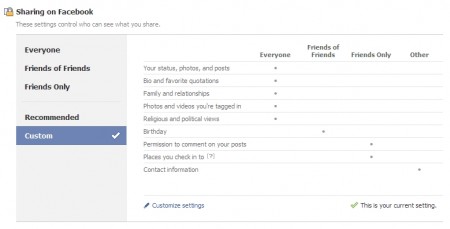
What should you do? When you arrive on this page, you’ll want to go to “Customize Settings.” This will take you to an options list. These are the general “who-gets-to-see-what” settings for your Facebook profile, and they aren’t difficult to figure out. Basically, you have four options for each content category that your Facebook profile contains:
- Everyone
- Friends of Friends
- Friends Only
- Customize
The first three options are fairly self-explanatory. With the fourth option, you can customize the various content categories to make them visible to some friends and not visible to others. For example, if you’ve created a list in your account that is made up of just family members, you could select to let just those on the list have the ability to see certain photos or albums in your account profile.
After you are satisfied with your selections in the Sharing section, click “Preview My Profile” – toward the top-right section of the page. This will let you see your profile as your friends see it. If there’s any information there that you’re not comfortable with people seeing, just return to the Sharing settings and make the necessary adjustments.
Connecting
What does it do? The “Connecting” settings let you set who can find you or contact you through your Facebook account and how. They also let you set parameters for some personal information in your account.
How do you get there? Account > Privacy Settings > Connecting on Facebook > View Settings
What does it look like?
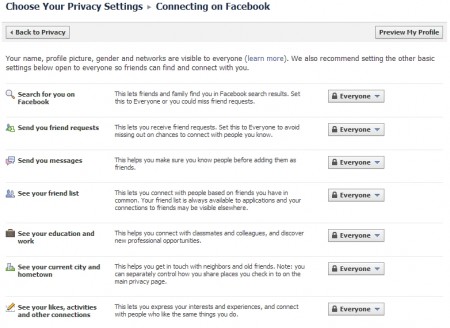
What should you do? The previous settings let you control what parts of your account information and profile you share and who you want to share it with. The Connecting settings (generally) let you decide who is able to find and connect with you and how they are able to make contact. The procedure is pretty much the same as the other settings. You’ve got the same four options to choose from for most of the categories and just two or three options for a few categories. Facebook moved some of the personal information categories to this page from “Sharing,” because people can (if you want) find you based on your employment, schools, hometown, and the city you live in. Simply set these to the viewing level you’re comfortable with.
After all that, which settings are you supposed to choose for all the various categories? It ultimately boils down to your personal preferences. We do have a recommendation though: If you are using Facebook to connect with customers and colleagues, move all the settings to “Everyone,” and then just don’t upload or post stuff that you don’t want your business contacts to see. Doing this allows your contacts to get a real feel for who you are, provides them with details about your business, and will tend to increase the number of friend requests you receive. This is important, because you’re going to suggest your business page to all your friends, so the more friends you have, the more people will “like” your page.
Do you have concerns about your privacy on Facebook? Let us hear your thoughts in the comments.
